What is Claude doing?
Every Claude Code session, what it’s doing right now, and everything it has started: the dev servers, containers and whole virtual machines. Spot what’s been left running, see your plan usage, and tidy up the disk space Claude uses.
Free · macOS 26 or later · Signed and notarised by Apple
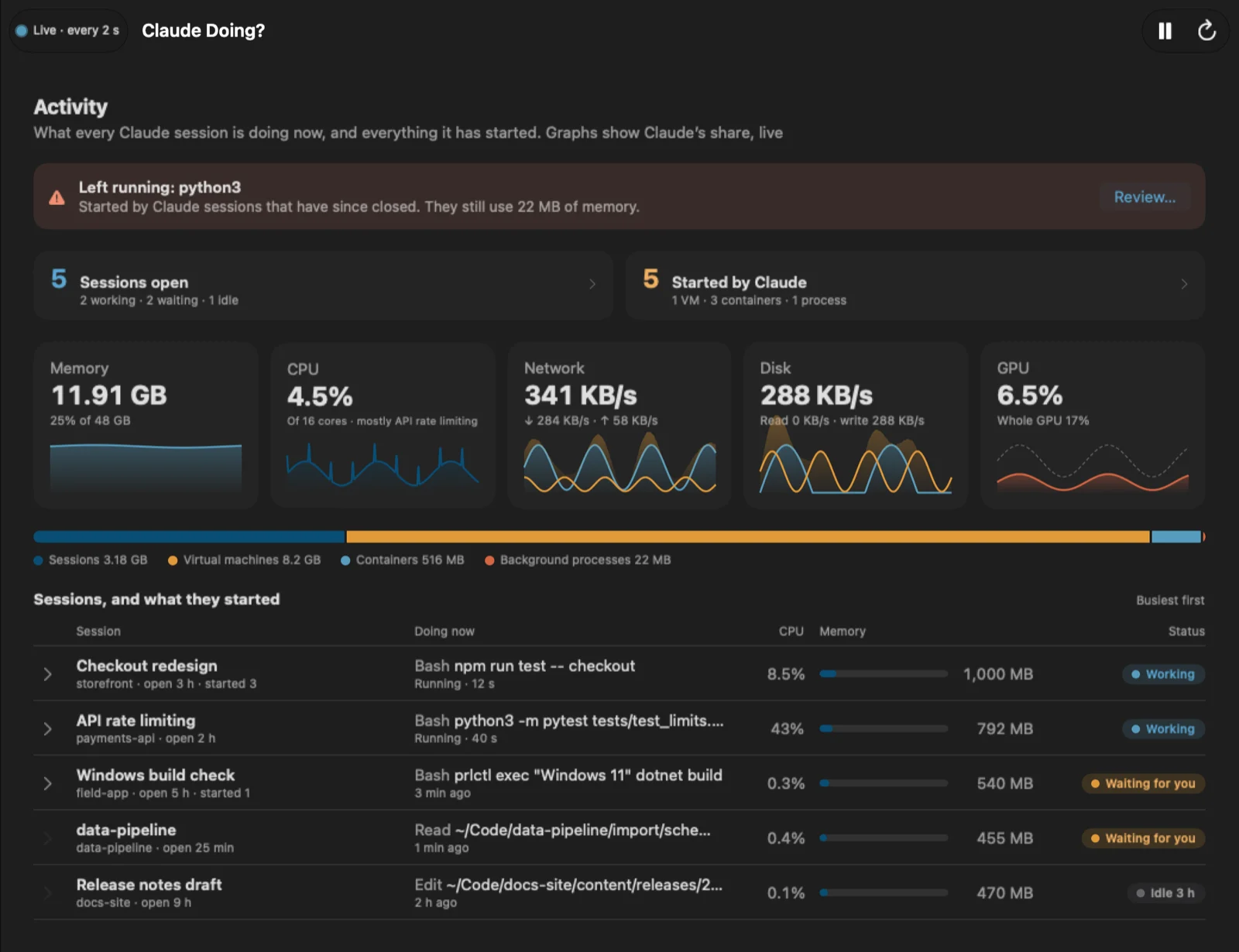
Everything Claude is up to, in one place
Claude Code runs a lot on your Mac: a process for every session, shells, servers and tools below them, and, through Docker or Parallels, containers and VMs that Activity Monitor files under those apps instead. Claude Doing? puts it all back together.
Every session, live
Each open Claude Code session, from the desktop app or the terminal, working, waiting for you or idle, with what it's doing right now, its CPU and memory, and live graphs of Claude's memory, CPU, network, disk and GPU use.
What each session started
Dev servers, MCP servers, Docker and Podman containers, Parallels, UTM, VMware, VirtualBox, Lima, Multipass, Tart and OrbStack VMs, each linked to the session that started it, with a Stop or Suspend button.
What's been left running
When a session closes, whatever it started can keep running. Claude Doing? flags it, tells you once, and stops it all with one click when you're ready.
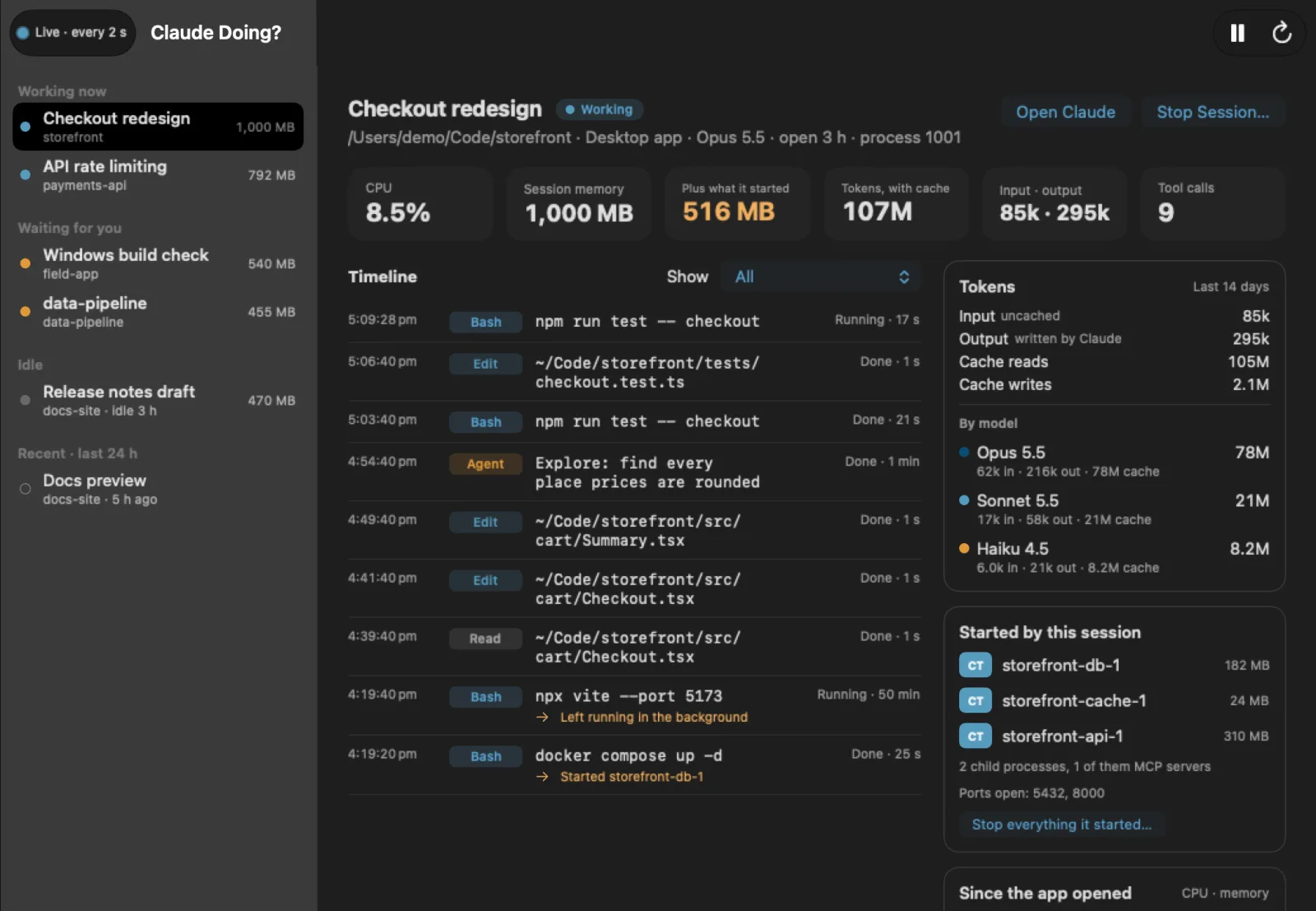
A timeline for every session
Every command, edit and search a session made, how long it took and whether it failed, the files it changed, and what it left running in the background.
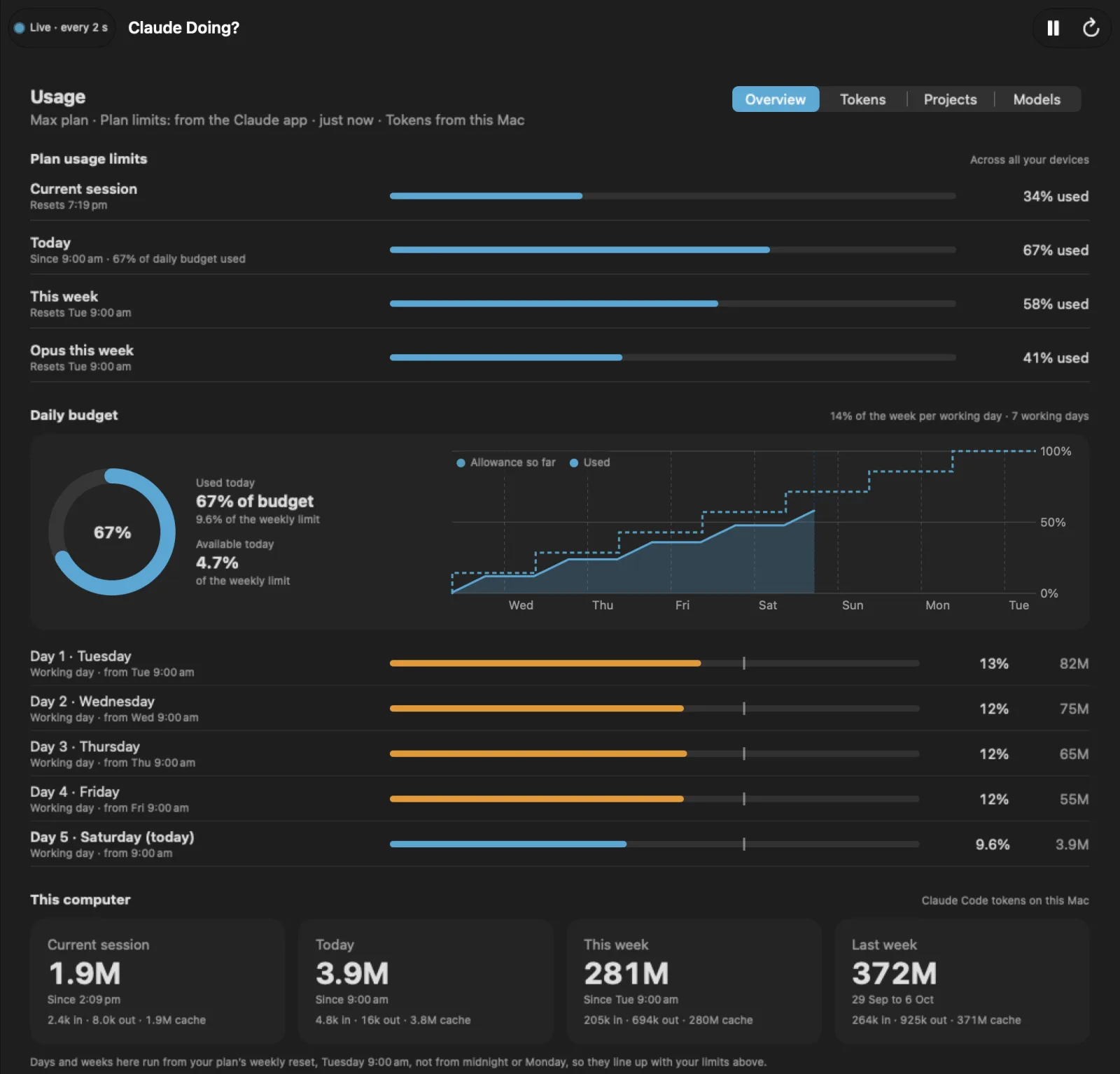
Plan usage and a daily budget
Your 5-hour, weekly and per-model limits, your weekly limit split across the days you work, tokens by hour, day, project and model with input and output shown apart, and amber and red alerts.
Storage, tidied safely
The gigabytes of caches, chat histories, screenshots and old versions Claude leaves on disk, each marked Safe, Check first, Keep or In use, with clean-up to the Trash and undo.
See exactly what a session did
Every tool call in order: the command or file, how long it took, and whether it failed. Filter to commands, files, or the calls that started something.
Beside it: its tokens, split into input, output and cache for each model it used, plus what it’s still running, the ports it opened, its CPU and memory over time, and every file it changed.
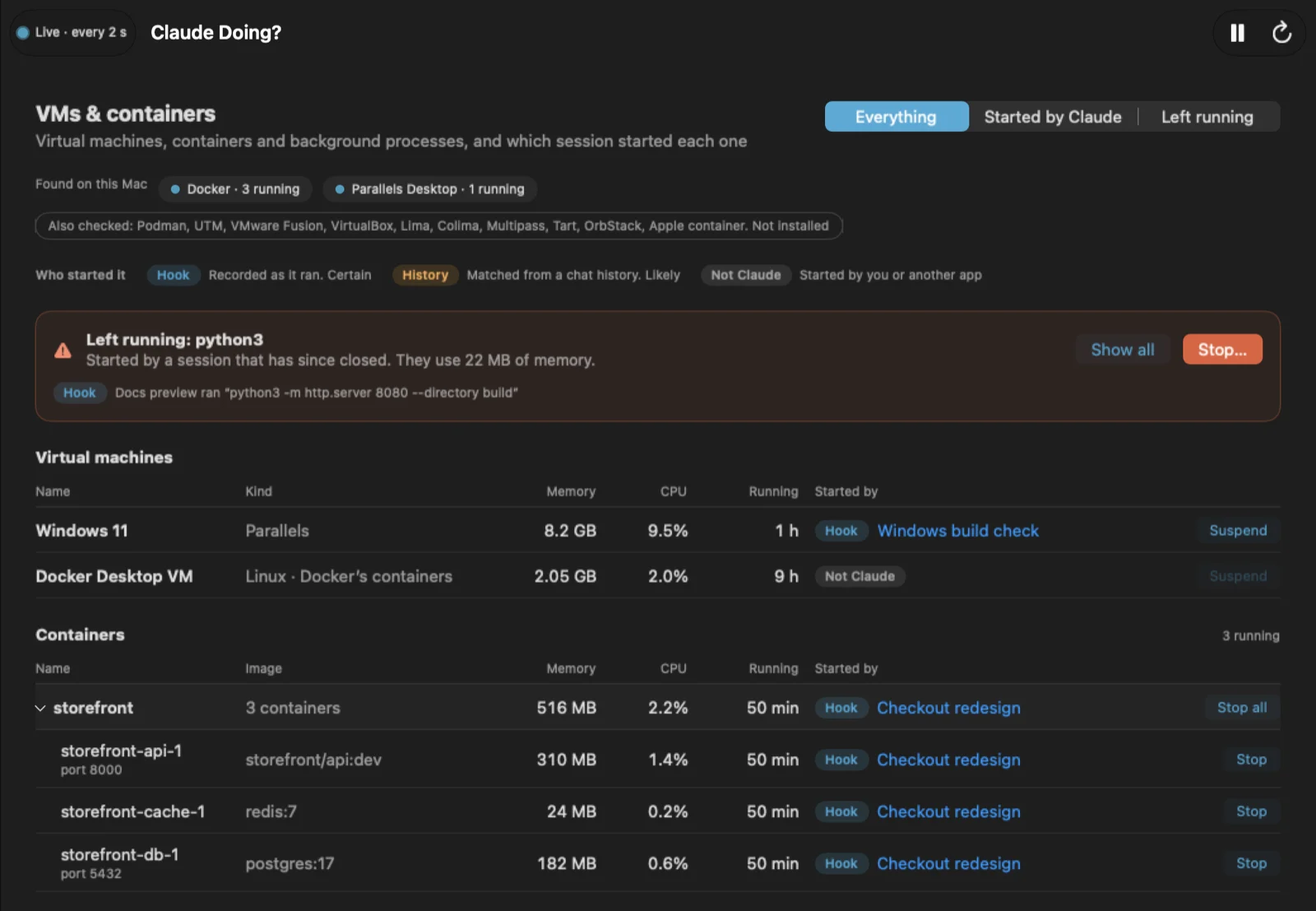
Who started that VM?
Twelve container and VM tools checked, from Docker and Podman to Parallels, UTM, VMware and Apple’s own container tool.
Each one labelled Hook (recorded as it ran: certain), History (matched from a chat history: likely) or Not Claude, and anything a closed session left running at the top, ready to stop.
Know your budget before you hit the limit
Your plan’s limits for the current session, the week and each model, with reset times, across all your devices.
The daily budget splits your weekly limit across the days you work, so you can see whether today is on track, and an alert arrives at the levels you choose.
This Mac’s tokens, with input, output and cache shown apart, for days and weeks that start when your plan resets, not at midnight or on a Monday, so they line up with your limits.
Always to hand, never in the way
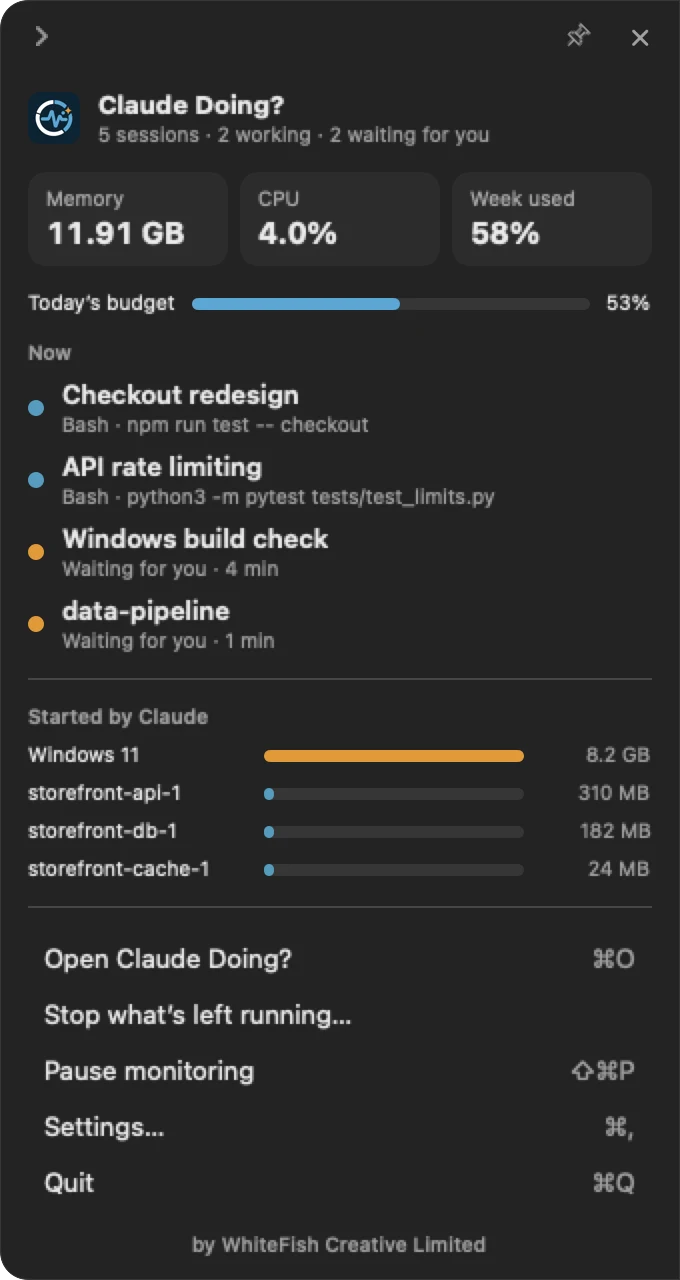
Dock a panel to either side of any screen. It slides between a tab, a slim strip with counts and live bars, and the full panel, and slides away when you click elsewhere unless you pin it.
There’s a menu bar item too, with what’s happening now and what Claude started.

Nothing changes until you say so
The app works as soon as it opens. Two optional extras make it complete; it asks before each one, shows exactly what it adds, and removes them again from Settings.
The hook: certain links
VMs and containers are started through other apps, so they never show up under the session that asked for them. A small hook in Claude Code’s settings writes one line to a log on your Mac for each tool call, so everything is linked to its session for certain. It never blocks or changes what Claude does, and adds nothing to its context.
The companion plugin: plan limits
Your plan’s limits can only be read from inside a Claude session. The companion plugin reads them there, with per-model limits and your sidebar’s groups, and passes them to the app for the daily budget and alerts. It adds nothing to your conversations and uses no tokens.
Download Claude Doing?
Version 0.2.0, released 10 October 2026. Free, for macOS 26 or later.
Claude-Doing-0.2.0.dmg · 6.1 MB
SHA-256 149a767973bec41c2d1c3f509a4eb794731711ff2c0e9bfc02c5971e46fe8cc5
Open the disk image and drag Claude Doing? to Applications. It keeps itself up to date: once a day it checks for a new release, signed by WhiteFish Creative, and asks before installing it. What’s new · All releases